High-Back Mesh Reclining Chair with Lumbar + Footrest
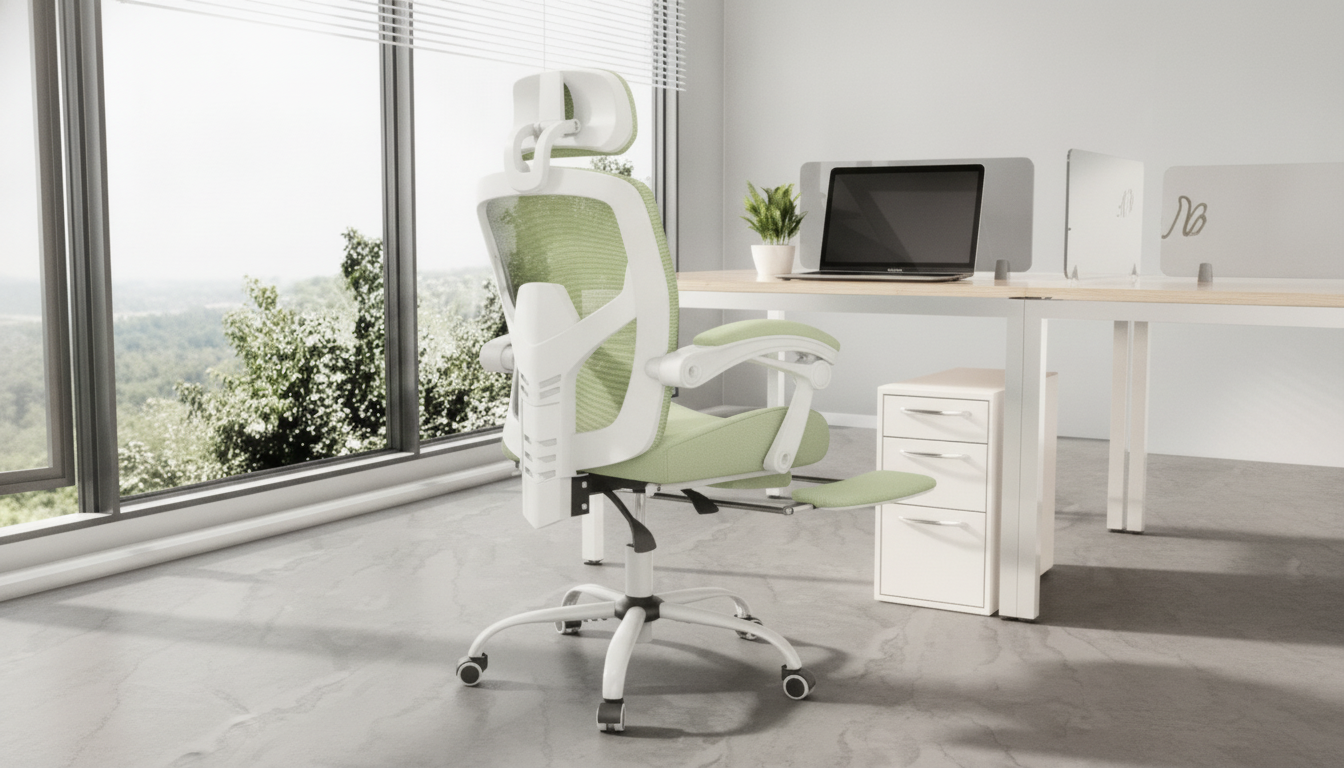
Ergonomic Reclining High Back Mesh Office & Gaming Chair with Lumbar Support and Footrest
Long hours at a desk can strain the lower back, shoulders, and hips—especially when posture shifts between focused work and relaxed gaming. A high-back mesh chair with recline, lumbar support, and a footrest is designed to keep airflow moving, support the spine’s natural curve, and offer comfortable position changes throughout the day. If your setup pulls double duty, the goal is simple: steady support when you’re upright, plus controlled relaxation when it’s time to lean back.
What makes a chair feel supportive for both work and gaming
“Supportive” isn’t just a firm seat or a tall back—it’s how the chair helps you stay aligned while still letting you move. For mixed use (emails by day, matches by night), these design elements matter:
- High backrest: Helps support the upper back and shoulders during longer sessions so you’re not constantly “holding” yourself up.
- Mesh back: Improves breathability, which can reduce heat buildup in warm rooms or under studio lights.
- Recline function: Encourages position changes, which can help reduce fatigue from staying in one posture too long.
- Lumbar support: Helps maintain a healthier lower-back curve during typing and controller use, where people often drift into a slouch.
- Footrest: Can reduce pressure on the legs and make reclined breaks feel truly restful instead of “dangling.”
Core comfort features to look for
Small differences in adjustability and seat design can be the difference between “fine for an hour” and “comfortable all afternoon.” Prioritize these core features when comparing options:
- Lumbar support: Best when it sits into the small of the back without pushing the pelvis forward. You want gentle fill, not a hard hump.
- Recline range: Useful for quick resets between tasks; pair it with stable tilt tension so the backrest doesn’t feel like it’s dropping.
- Seat cushioning and shape: A supportive seat reduces tailbone pressure; the front edge should not dig into thighs as you shift positions.
- Arm support: Comfortable arm positioning helps reduce shoulder shrugging. Aim for elbows near 90 degrees when typing so wrists can stay neutral.
- Footrest build: A smooth extension and stable surface improves comfort during reclined use, especially for short “recovery” breaks between games or meetings.
For a practical all-in-one pick, the Ergonomic Reclining High Back Mesh Office & Gaming Chair with Lumbar Support and Footrest is built around those essentials: breathable high-back mesh, supportive lumbar shaping, and a footrest that makes reclining feel intentional rather than awkward.
Fit and setup checklist for healthier posture
Even a great chair can feel “off” if the height, screen position, or desk reach encourages compensations. Use the checklist below as a quick starting point, then fine-tune over a few days of normal use.
- Seat height: Adjust so feet rest flat; knees roughly level with hips or slightly below.
- Back contact: Sit back so the lumbar support meets the lower back; avoid perching on the edge.
- Monitor height: Top of the screen near eye level to reduce neck flexion.
- Keyboard and mouse: Keep close enough to avoid reaching; forearms supported when possible.
- Recline breaks: Alternate between upright work posture and brief reclines to reduce prolonged static loading.
Quick fit guide (targets for common desk setups)
| Adjustment | Starting point | What to feel |
|---|---|---|
| Seat height | Feet flat, knees ~90° | No pressure under thighs; stable footing |
| Lumbar position | Centered at belt-line area | Lower back supported without arching excessively |
| Arm position | Elbows ~90° and close to body | Shoulders relaxed, wrists neutral |
| Recline for breaks | Gentle recline with stable tension | Back stays supported; no sliding forward |
| Footrest use | Heels supported when reclined | Legs feel lighter; reduced pressure behind knees |
For more workstation fundamentals, the guidance from OSHA’s Computer Workstations eTool and the Mayo Clinic office ergonomics guide is a helpful reference when you’re dialing in monitor height, input placement, and chair positioning.
Who this style of chair tends to suit best
A reclining high-back mesh chair with lumbar support and a footrest generally fits people who need both structure and flexibility:
- Home-office users: Breathable support can feel noticeably better through warm seasons and long video calls.
- Gamers: Ideal for switching between upright focus and a relaxed recline between matches or during cutscenes.
- Students and creators: Helpful for extended desk blocks where small posture changes add up over time.
- Anyone dealing with lower-back fatigue: Lumbar contouring can reduce the “collapsed” sitting posture that often shows up late in the day.
Everyday use tips to keep the chair feeling good longer
The chair is only half the equation. The other half is how you use it across the day—especially when attention is locked in and posture starts to drift.
If you like a more immersive setup for breaks, pairing your chair time with clean audio can make a quick reset feel more refreshing. The RGB Wireless Bluetooth 5.3 Speaker is an easy add-on for desk background music, study sessions, or casual gaming without tying up your headset.
Ergonomic Reclining High Back Mesh Office & Gaming Chair with Lumbar Support and Footrest: highlights
FAQ
Is a mesh back better than leather for long sessions?
Mesh is often preferred for long sessions because it breathes better and can reduce heat buildup. Comfort still depends on overall fit, lumbar shape, seat cushioning, and how well the chair matches your body and desk height.
How should lumbar support feel when adjusted correctly?
It should feel like gentle support filling the natural curve of your lower back without forcing you forward. Sit fully back in the seat so your pelvis and shoulders stay aligned and the support meets you where you naturally curve.
When should the footrest be used?
Use the footrest during reclined breaks, casual reading, or relaxed gaming to take pressure off the legs. For active typing or competitive play, feet flat on the floor usually provides better stability and posture control.



Leave a comment