Adjustable Kids Desk & Chair: Tilt Top + Storage Guide
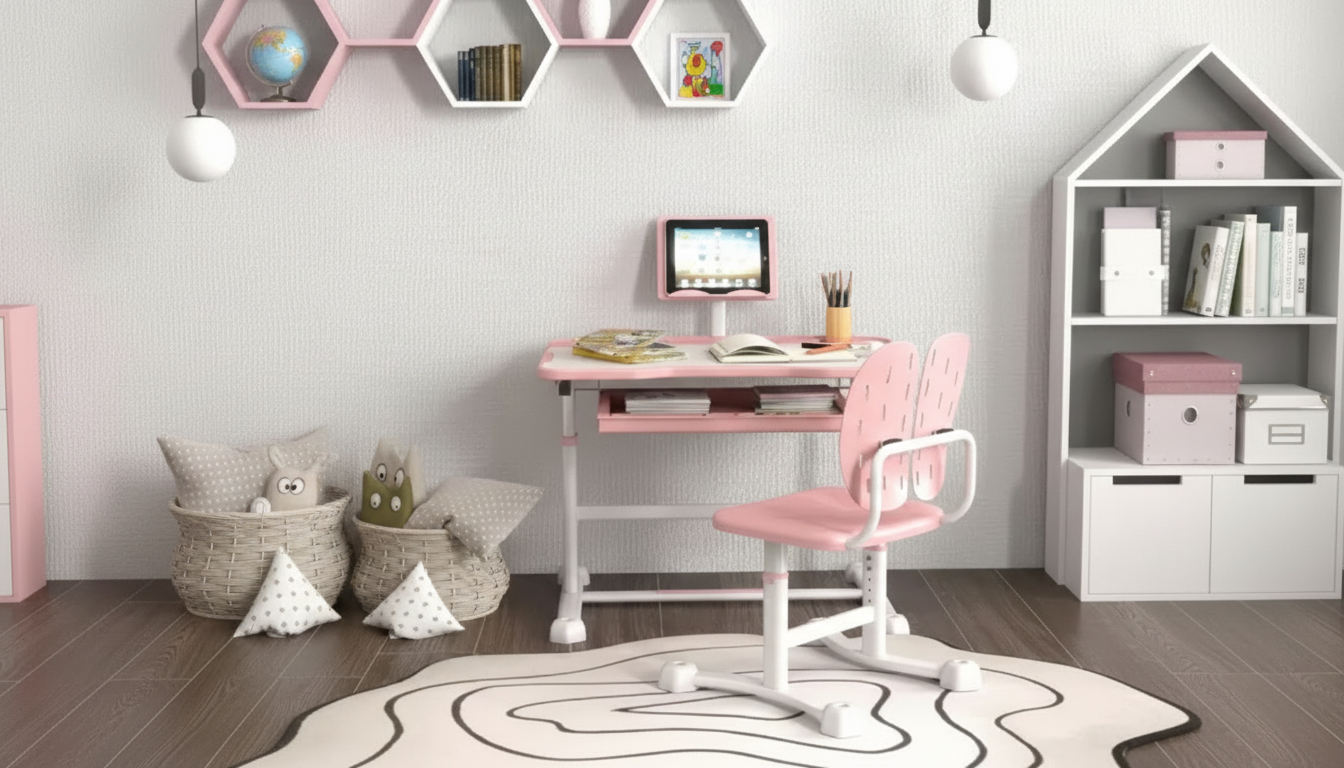
Height Adjustable Kids Desk and Chair Set with Tilt Desktop & Storage
A desk setup that fits a growing child can make homework, reading, and drawing more comfortable and less distracting. This height adjustable kids desk and chair set pairs a tilting desktop with built-in storage to help keep posture-friendly positioning and everyday supplies within easy reach.
What this desk-and-chair set is designed to solve
- Supports a better fit as children grow by allowing height changes instead of forcing a one-size setup
- Encourages comfortable viewing angles for reading and writing with a tilting desktop option
- Reduces clutter with storage that keeps pencils, notebooks, and small items organized
- Creates a dedicated “study zone” that can improve routine and focus
- Helps parents avoid frequent furniture replacement as needs change
At-a-glance features
- Height-adjustable desk and chair pairing for coordinated fit
- Tilting desktop for reading, writing, and drawing angles
- Storage space for school supplies to keep the surface clearer
- Kid-friendly layout sized for common school tasks
- Practical choice for bedrooms, playrooms, and homework corners
Quick overview
| Feature | Why it helps day to day |
|---|---|
| Height adjustability | Adapts to growth and supports a more comfortable seated position over time |
| Tilt desktop | Helps set a clearer viewing angle for books and reduces hunching during close-up work |
| Built-in storage | Keeps supplies accessible and limits desk-top clutter |
| Desk + chair set | Provides a matched setup so seat and surface height work together |
| Everyday study use | Fits common activities like homework, reading, crafting, and computer-free learning |
Getting the fit right: simple setup checkpoints
- Seat height: adjust so feet can rest flat (or on a stable footrest) and knees are comfortably bent.
- Desk height: set so forearms can rest without raising shoulders; wrists stay neutral while writing.
- Desktop tilt: use a slight angle for reading and drawing; flatten it for tests, crafts, and activities needing stability.
- Lighting: position a lamp to reduce shadows on the work area and limit eye strain.
- Storage routine: assign “home spots” (pencils, eraser, ruler, scissors) so clean-up stays quick.
For general ergonomics guidance that applies to kids’ workstations too, resources from HealthyChildren.org (American Academy of Pediatrics) and NIOSH are helpful references when fine-tuning posture and workstation habits.
How the tilt desktop can support reading and handwriting
- Angled surfaces can make text easier to see without leaning forward as much.
- A modest tilt is often preferred for drawing and handwriting practice, while a flat setting works better for building and crafts.
- Pairing the tilt with correct chair height helps keep shoulders relaxed rather than lifted.
- For longer sessions, encourage short breaks to reset posture and reduce fatigue.
A practical approach is to start with a small angle and adjust based on the task: slightly angled for reading time, a comfortable mid-tilt for handwriting drills, and fully flat for anything that requires firm pressure or steady pieces (like rulers, glue, or blocks). Building in movement breaks also supports healthier routines for kids who tend to stay seated for long stretches; CDC Healthy Schools offers guidance around reducing sedentary time.
Storage that actually gets used
- Keep high-frequency items (pencils, erasers, sharpeners) in the quickest-to-reach compartment.
- Store heavier items lower to reduce tipping risk when opening compartments.
- Use a simple daily reset: 60 seconds to clear the surface and return supplies to storage.
- Consider a dedicated folder slot or bin for “today’s homework” to reduce lost papers.
When storage is easy to access, it becomes part of the work flow instead of a “clean later” problem. A clear desktop also helps kids visually prioritize what they’re doing now—worksheet, book, or sketch—without competing piles. Keeping one small “current project” spot is often enough to maintain momentum while still preventing clutter creep.
Safety, durability, and care
- Place the set on a level surface; if used on thick carpet, ensure the chair stays stable while scooting.
- Teach children to adjust tilt and height with adult help until they understand safe operation.
- Wipe surfaces regularly to keep the writing area smooth and easy to use.
- Periodically re-check fasteners and adjustment points as part of routine home maintenance.
- Avoid overloading storage areas with items that could affect stability or make drawers hard to open.
A quick seasonal check (back-to-school, mid-year, and summer) keeps the setup working as intended: confirm height settings still match your child, tighten any loosened hardware, and remove outdated papers that may have migrated into storage areas.
When this set is a good match
Product details and availability
- Product: Height Adjustable Kids Desk and Chair Set with Tilt Desktop & Storage
- Current price: $126.01 (USD)
- Availability: In stock
- For the latest images, shipping details, and any updated specifications, use the product page link above.
Helpful add-ons for a calmer study corner
- Background audio for focus: A compact speaker can be useful for audiobooks, timed study sessions, or calm music at low volume. Consider the RGB Wireless Bluetooth 5.3 Speaker if a wireless option fits your space.
FAQ
What is the tilt desktop best used for?
Use a gentle tilt for reading and drawing to help keep the page easier to see without leaning in. Keep it flat for crafts, tests, or any activity that needs a stable surface. Start with small angles and adjust based on comfort and control.
How often should the height be adjusted for a growing child?
Check the fit every few months, and sooner after noticeable growth spurts. A quick test is whether feet are supported, elbows rest comfortably at the desk, and shoulders stay relaxed while writing.
How can storage help kids stay focused during homework?
When supplies are within reach, kids spend less time getting up and losing their place. Storage also reduces visual clutter on the desktop, making the current task feel simpler. A quick daily reset helps keep the system working.



Leave a comment